eBay seller app: your whole workspace
Tyasi brings sourcing, listings, orders, buyer messages and profit reports into one workspace for US eBay sellers. See what needs attention and work through the day from the find to the profit report.
Your eBay seller dashboard
Start with the Daily Briefing: overnight sales, orders to ship, deadlines, exceptions to review and what your strategies did while you slept. It comes with Operator and Business.
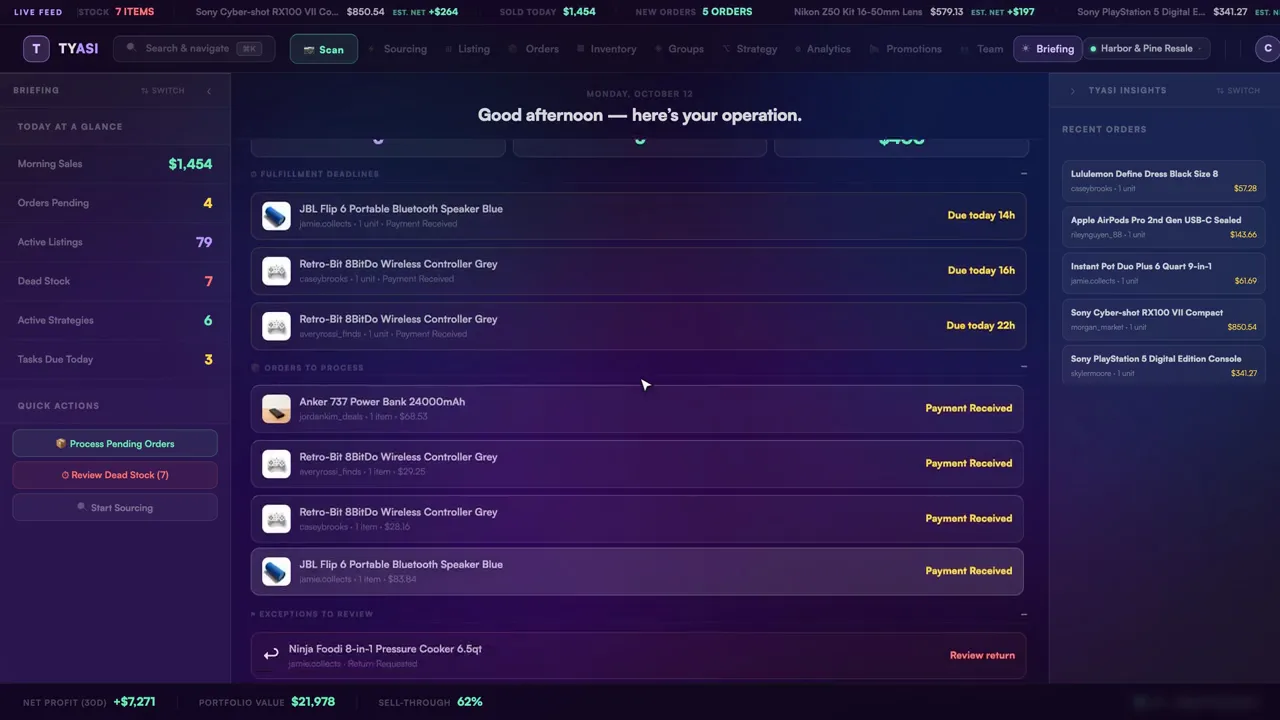
Orders are sorted by shipping deadline. Analytics shows sales, profit, margin, sell-through and store health for the period you pick; the reports available depend on your plan.
For performance checks, read where to find your eBay seller health and handling-time measures.
Plan your first tasks with the eBay daily briefing and 15-minute morning routine.
For dispatch work, follow the daily eBay order-management workflow, including labels, tracking and a 1-day handling example.
Seller tools for the whole day
- Sourcing: Deal Score, sold comps, a watchlist and a buying list help you assess what to buy.
- Orders and shipping: Print pick lists and packing slips, buy labels through your own Shippo or EasyPost account and send tracking to eBay.
- Buyer messages and returns: Read and answer messages, handle returns and respond to Best Offers.
- Strategies: Set rules to reprice, relist, flag or alert; repricing never goes below your margin floor.
- Promotions: Manage Promoted Listings campaigns, sale events, coupons and volume pricing.
- Reports: Review your numbers, export reports and ask Tyasi questions about your business.
- Stores and team: Operator and Business add multiple stores, team seats, tasks and activity.
- Fee estimates: Use the free eBay fee calculator to work out fees and profit before a sale.
Strategies, Groups, Promotions and the Daily Briefing come with Operator and Business. Business adds the full profit-and-loss report, forecasts and stores compared side by side.
Weighing Tyasi against other tools? See eBay seller tools compared.
Sharing the workload? Read how to add eBay team members and split tasks.
Listing, as part of the workspace
Prepare and review listing details, set your price and publish. See the eBay listing tool for the fields, recording and listing workflow.
Inventory, at a glance
See cost, price, margin and days listed, with dead stock one filter away. See eBay inventory management for what Tyasi tracks and how it works with your store.
Organize your catalog with our guide to setting up and managing eBay storefront sections.
Have a return to resolve? See how to manage returns on eBay for reason-specific steps and a worked return-rate example.
For buyer comments and public replies, see how to manage feedback on eBay.
How it works
- Sign up and connect your store. Approve access on eBay's own sign-in page; Tyasi never sees your eBay password.
- Review your work. Check orders and reports, or use the Daily Briefing on Operator and Business to see what needs attention.
- Work through the day. Source, prepare listings, ship orders and review results in Tyasi; switch on a strategy only when you want it to run.
Pricing
Monthly plans in US dollars, plus applicable tax:
- Solo: $29/month. 1 eBay store.
- Operator: $69/month. 3 eBay stores and 2 team seats.
- Business: $179/month. 5 eBay stores and 5 team seats.
Try any plan free for 14 days. Card required. You're charged only if you keep Tyasi after 14 days. AI and eBay lookups draw on a monthly call pool with rollover. See pricing for annual billing, plan details and guarantee terms.
What it doesn't do
- Tyasi works with eBay in the US only; it does not crosslist to other marketplaces.
- Tyasi has no access to your eBay payouts.
- Strategies start switched off. Nothing runs on a schedule until you switch it on.
Live Search is limited each day while eBay raises Tyasi's search allowance. Your searches reset at midnight ET. Competitor searches in strategies are limited each day while eBay raises Tyasi's search allowance. This is on purpose, not a fault, and every other feature in your plan works as usual.
eBay seller app FAQ
Is there an App Store or Google Play app?
No. Tyasi runs on the web at tyasiapp.app, in your browser. There is no App Store or Google Play app.
Does every plan include the Daily Briefing?
No. The Daily Briefing is included with Operator and Business. Solo includes inventory, orders, shipping labels, basic analytics and Ask Tyasi.
Will Tyasi send buyer messages on its own?
No. Tyasi doesn't send messages, leave feedback or respond to offers on its own; those actions are yours to take.
The fine print
eBay is a trademark of eBay Inc. Tyasi is an independent product, not affiliated with or endorsed by eBay.